Slicer: Difference between revisions
Jump to navigation
Jump to search
No edit summary |
mNo edit summary |
||
| Line 2: | Line 2: | ||
|imagefile=Logo Slicer for Fusion 360.png | |imagefile=Logo Slicer for Fusion 360.png | ||
|imagewidth= | |imagewidth= | ||
| | |developer=Autodesk | ||
| | |uses=CAD, CAM | ||
| | |operatingsystem=Windows, Mac OS | ||
}} | }} | ||
'''Slicer''' is an Add on to Fusion 360 that has been created by Autodesk. Slicer simplifies the process of taking a 3D object and slicing it suitable for Laser Cutting or CNC cutting. | '''Slicer''' is an Add on to Fusion 360 that has been created by Autodesk. Slicer simplifies the process of taking a 3D object and slicing it suitable for Laser Cutting or CNC cutting. | ||
Latest revision as of 20:56, 25 June 2019
| Slicer | |
|---|---|

| |
| Developer | Autodesk |
| Uses | CAD, CAM |
| Operating System | Windows, Mac OS |
| Software: all pages {{}} | |
Slicer is an Add on to Fusion 360 that has been created by Autodesk. Slicer simplifies the process of taking a 3D object and slicing it suitable for Laser Cutting or CNC cutting.
Where to get it
How to use
Stacked Slices
-
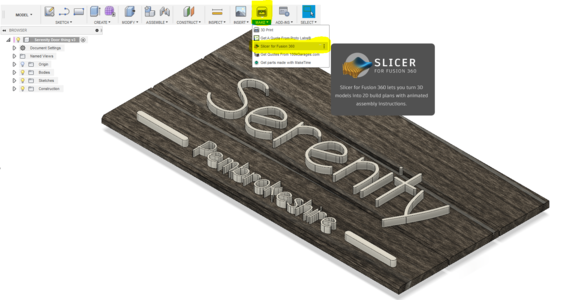 Step 1 - Open Slicer Extension
 -
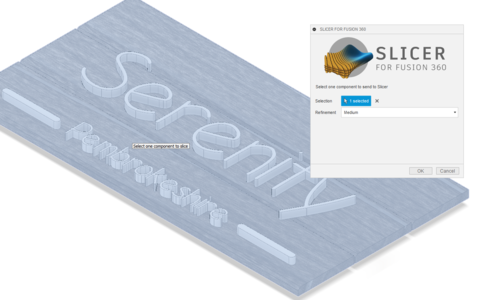 Step 2 - Select the model
 -
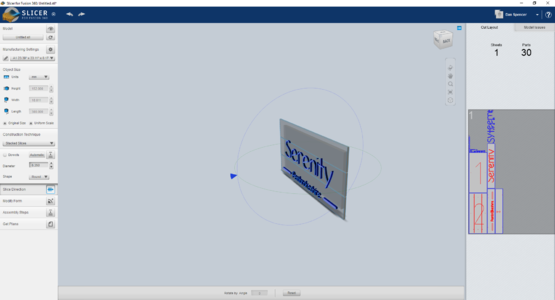 Step 3 - Set up the Slicing settings
 -
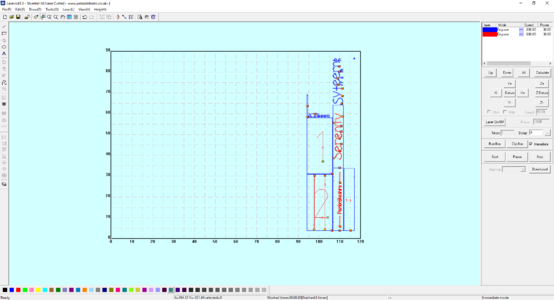 Step 4 - Import DXF directly to Lasercut 5.3


