Electronics Area: Difference between revisions
No edit summary |
No edit summary |
||
| Line 6: | Line 6: | ||
|floorplanimage=File:Floorplan - Electronics Area.png | |floorplanimage=File:Floorplan - Electronics Area.png | ||
}} | }} | ||
The '''Electronics Area''' has three bays for working on [[:Category:Electronics|electronics]], plus a larger bench for taking things apart and working on larger items. It is equipped with soldering irons, power supplies, oscilloscopes, signal generators, frequency counters, a microscope, (soon) extraction and more. It in located in | The '''Electronics Area''' has three bays for working on [[:Category:Electronics|electronics]], plus a larger bench for taking things apart and working on larger items. It is equipped with soldering irons, power supplies, oscilloscopes, signal generators, frequency counters, a microscope, (soon) extraction and more. It in located downstairs in [[Hackspace 2.5]] and shares its space with the [[3D Printer Area]]. The electronics area used to be upstairs in the workshop, against the wall into the studio. | ||
==Benches== | ==Benches== | ||
| Line 50: | Line 50: | ||
==Consumables== | ==Consumables== | ||
There are a huge number of components available in the electronics area. It is incredibly difficult to keep track of individual components, but there are a few lists available for specific things. For example, for 74 series logic, there is the [[Electronics ICs Map]] (thanks to [[User: | There are a huge number of components available in the electronics area. It is incredibly difficult to keep track of individual components, but there are a few lists available for specific things. For example, for 74 series logic, there is the [[Electronics ICs Map]] (thanks to [[User:Jsmith|Jason]]) - with these, please do not move the drawers around, try to keep it organised. For a more general inventory of components, take a look at [[Electronics components]] (thanks to [[User:Dclarke|David]]). | ||
The use of these components is subject to the same fair usage for all consumables in the space. Please do use things, but contribute back when you can. If you are using something specific (e.g. a transformer), you should try to make a fair donation to the space. If you are using lots of a specific component, you should probably buy some for yourself, and leave the spares in the space, while using smaller amounts of other things. | The use of these components is subject to the same fair usage for all consumables in the space. Please do use things, but contribute back when you can. If you are using something specific (e.g. a transformer), you should try to make a fair donation to the space. If you are using lots of a specific component, you should probably buy some for yourself, and leave the spares in the space, while using smaller amounts of other things. | ||
Revision as of 20:16, 28 January 2025
| Electronics Area | |
|---|---|
 | |
| Intended Use | Workshop area for working on Electronics Projects |
| Team | Electronics |
| Floor | Downstairs |
| Map | 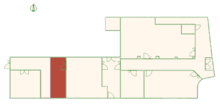 |
| Locations: all pages {{}} | |
The Electronics Area has three bays for working on electronics, plus a larger bench for taking things apart and working on larger items. It is equipped with soldering irons, power supplies, oscilloscopes, signal generators, frequency counters, a microscope, (soon) extraction and more. It in located downstairs in Hackspace 2.5 and shares its space with the 3D Printer Area. The electronics area used to be upstairs in the workshop, against the wall into the studio.
Benches
The electronics area benches are each intended for a different purposes. While you are free to move things around, please try to put things back roughly where you found them so that the benches are always ready for their intended purpose. From the window to corridor, these benches are the test bench, rework bench and soldering bench. There is also a large bench next to the corridor which can be used for assembly and larger projects.
- Test Bench - This is where most of the test equipment lives. It should, at the very least, be equipped with the Rigol Oscilloscope, power supplies, signal generator, bench multimeter, etc. We do not recommend soldering at this bench as it risks damage to the oscilloscope (and any other test equipment on the bench).
- Rework Bench - Hot air rework station and soldering iron. This is the bench intended for "fixing things", but you can use it as a normal soldering bench. It should have the same consumables as the soldering bench.
- Soldering Bench - Soldering iron, solder sucker, side snips, board assembly equipment.
As of January 2025, there are plans to extend the test bench along the wall, to make a new bench shared with the 3D Printer Area. This will provide more space for the Microscope and Reflow Oven.
No where in the Electronics Area is appropriate for circuit board etching. The general advice is that this should not be done in the space, due to past accidents. It's much safer, more environmentally friendly, more convenient and likely cheaper to get your circuit boards manufactured professionally.
Tools
Please see Tools and Equipment in Electronics Area and create tool pages for things which are missing. However, some of the newer or more interesting tools are:
- Rigol DM3068 Benchtop Multimeter - A digital multimeter with 6½ digits.
- Rigol DS4024 Oscilloscope - Up to 500MHz with a nice set of probes.
- Rigol DP832 Linear DC Power Supply - Three output channels, able to provide up to 30V at 3A.
- Siglent SDG1062X Signal Generator - A fourteen bit arbitrary waveform generator.
- Multicomp Soldering Stations - Able to maintain temperature well and supports a variety of tips. We have two of these.
- AD249S-M Digital Microscope - Up to 2000x magnification.
- T-962A Reflow Oven - For reflowing boards, who needs soldering irons?
Previous Pledge Drives
Most of the test equipment in the electronics area has been paid for by members through Pledge Drives. Please treat the tools with respect, some people have contributed a lot of money towards them!
- 2014 - Oscilloscope Pledge - Rigol DS1102E (2 channel, 100MHz bandwidth)
- 2014 - Samsung SVP-5500ST - The Embiggener
- 2016 - Electronics Test Kit Pledge
- Rigol RS4024 200MHz 4-Channel Digital Oscilloscope - Unlocked to 500MHz.
- Rigol DM3068 6½ Digit Digital Multimeter
- Rigol DP832 Linear DC Power Supply
- 2023 - Waveform Generator Pledge - Siglent SDG1062X Arbitrary Waveform Generator
- 2025 - 2025 Electronics Pledge Drive
- T-962A Reflow Oven
- AD249S-M Digital Microscope
- The Defumener - Soldering extraction
Consumables
There are a huge number of components available in the electronics area. It is incredibly difficult to keep track of individual components, but there are a few lists available for specific things. For example, for 74 series logic, there is the Electronics ICs Map (thanks to Jason) - with these, please do not move the drawers around, try to keep it organised. For a more general inventory of components, take a look at Electronics components (thanks to David).
The use of these components is subject to the same fair usage for all consumables in the space. Please do use things, but contribute back when you can. If you are using something specific (e.g. a transformer), you should try to make a fair donation to the space. If you are using lots of a specific component, you should probably buy some for yourself, and leave the spares in the space, while using smaller amounts of other things.
Generally we do not stock components, but we do try to make sure we always have consumables for doing things in the space. These include:
- Solder
- Kapton tape
- Wire (although spool donations are likely to be welcome!)
- Isopropyl Alcohol
- Cotton buds and Paper Towel
Extraction
Soldering produces flux fumes, which aren't particularly harmful but somewhat unpleasant and may cause headaches. We've recently been working on installing extraction in the electronics area. This will provide two adjustable extractor tubes, one for the rework bench and one for the solder bench. Our initial testing is promising and shows that a decent bathroom extractor fan is more than sufficient for soldering.
Problems or Issues
If you suspect something is broken, or broke something, please let the Electronics Team know. The best way to do this is by posting in the electronics channel on Discord.
Regular Chores
There are a few things which need to be done in this area to keep it looking nice and usable. Please consider helping with these!
- Empty the bin (see How to take out the rubbish)
- Sweep the benches - while many do their best, it's easy to miss a few wire clippings. These accumulate.
- Sweep the floor - many of those clippings fall on the floor.
- Tuck the chairs in - There are quite a lot of chairs in this area, and often they are all in the middle of the room for some reason. For the benefit of people attending the member's tour, please try and put them somewhere sensible (like tucked under the benches).
Donations
It's very tempting to dump old electronics here because after all, it's named the Electronics Area. Don't do this - very few people will be interested in trying to repair your broken electronics. However, if you have test equipment, useful parts or consumables which you'd like to get rid of, please post a message in #electronics asking if it would be useful. Thank you! :)
See also
Probably out of date:
| Tools and Equipment in Electronics Area |
|---|
| Locations | |||||||
|---|---|---|---|---|---|---|---|
| Upstairs | Comfy Area • Studio • Members Storage • Textiles Workshop • Kitchen • Toilets • Workshop • Dusty Area • Metalworking Area • Spray Booth • Laser Area • CNC Area • Screen Printing | ||||||
| Downstairs | 3D Printer Area • Electronics Area • Blue Room • Team Storage • Metalworking Downstairs • Members Storage Downstairs • Classroom • Bike Area • Main Corridor • CNC Corridor | ||||||
Changes in Category:Electronics List of abbreviations:
13 December 2025
| |||||||